Build SQL with Arturo blocks, compile it for SQLite or PostgreSQL, and keep SQL text separate from parameter values.
SELECT sql AS "À la Arturo";
Build queries with expression.


~ CODE IS ART ~



Build SQL with Arturo blocks, compile it for SQLite or PostgreSQL, and keep
SQL text separate from parameter values.
- Query: filters, joins, aggregates, subqueries, CTEs, and set operations.
- Write: insert, update, and delete rows; define tables, views, and triggers.
- Inspect: build a statement once, then choose a dialect when compiling.
Important
Requires Arturo 0.10.0+. SQLite execution is included. For PostgreSQL,
compile the statement and pass the output to your own driver.
Quick start · Run a query ·
Documentation · Development
At a glance
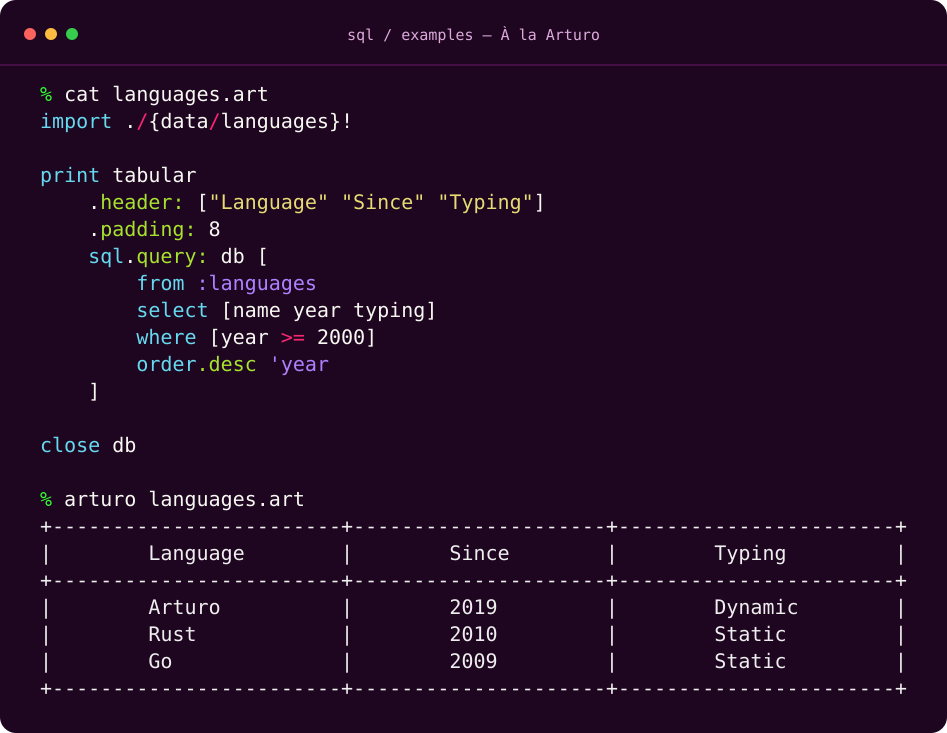
Try this SQLite example with arturo examples/languages.art.
It queries programming languages and formats the results with tabular.
Installation
arturo -p install sql
Command-line interface
The sql CLI lets you execute Arturo SQL DSL statements against SQLite databases or compile them into SQL without establishing a database connection.
Usage
# Display available commands and options
sql --help

# Execute a query (table output by default)
sql query books.db 'from :books select title'

# Execute a query and return JSON
sql query books.db 'from :books select title' -o json

# Read a DSL statement from a file
sql query books.db --file examples/query.art

# Compile a statement into PostgreSQL SQL
sql compile 'from :books select title' -d postgres
Commands
query: Executes a DSL statement against a SQLite database. Pass the expression directly, nosqlstatement needed.compile: Generates SQL text and bound parameters without connecting to a database.
Statements are privided directly in the CLI, but you may also load from files using --file/-f.
Files must contain a single statement using our DSL.
Run sql <command> --help for additional options and usage details.
Quick start
Import the package, build a statement, and compile it:
import {sql}!

minimumAge: 18
statement: sql [
    from :users
    select [id name]
    where [age >= @minimumAge]
    order 'name
    limit 20
]

compiled: to :sqliteQuery statement
print compiled\text
inspect compiled\params
Inside sql [...], names such as age refer to columns. Use @minimumAge
to capture an Arturo variable as a parameter value.
sql returns an inspectable statement dictionary. Conversion gives you
text and params without executing the query. To target PostgreSQL instead,
use to :postgresQuery statement.
Run a query
Use sql.query: with an open SQLite connection:
import {sql}!

db: open.sqlite ":memory:"
failure: try [
    ignored: sql.query: db [create :books [column 'title :string]]
    ignored: sql.query: db [insert.columns: 'title :books -> row ["River Atlas"]]
    rows: sql.query: db [from :books select 'title]
    print tabular.header: ["Title"] rows
]
close db
unless null? failure -> throw to :string failure
You own the connection. This pattern closes it even if a query fails, then
rethrows the error. For return values and formatting options, see
execution and formatting.
Documentation
| Looking for… | Read |
|---|---|
| Commands, arguments, and validation rules | API reference |
| Query layout and naming conventions | Style guide |
| Examples of a particular SQL feature | Feature catalog |
| Dialect differences and driver output | Compiled output |
| Planned features and dialect support | Roadmap |
For runnable scripts, browse examples/. From a local checkout:
arturo src/main.art
arturo examples/sqlite.art
arturo examples/postgres.art
The PostgreSQL example compiles SQL without opening a database.
Development
From the repository root:
arturo -p install unitt
unitt
Use Unitt 3.1.1+ and add ~/.arturo/packages/bin to PATH.
CI runs the suite on Linux, macOS, FreeBSD, and Windows.
The suite covers statement construction, compilation, SQLite execution, and
all feature catalog examples. The self-testing scripts in examples/ provide
additional usage checks; examples/api.art uses an in-memory database.
License
Released under the MIT License.
| 1.0.0 | 3 November 2026 | 2870373 / 117 files |